Skip to content

moltbot

2/5/2026

https://github.com/moltbot/moltbot

1. 本地体验

https://damodev.csdn.net/697eed9b7c1d88441d9111e8.html

powershell(以管理员方式打开)

yaml
https://damodev.csdn.net/697eed9b7c1d88441d9111e8.html

1.1 用wsl(没成功)

https://github.com/spoto-team/openclaw-wsl-guide

先设置网络为镜像

安装node.js

npm

yaml
npm i -g openclaw
openclaw onboard --install-daemon

或者一键安装

yaml
curl -fsSL https://openclaw.ai/install.sh | bash

验证安装

yaml
which openclaw
openclaw --version
openclaw gateway status

1.1.1 windows本地

yaml
npm i -g openclaw@latest
openclaw onboard --install-daemon

安装完后,如果网关没有启动,可以执行

yaml
openclaw gateway
yaml
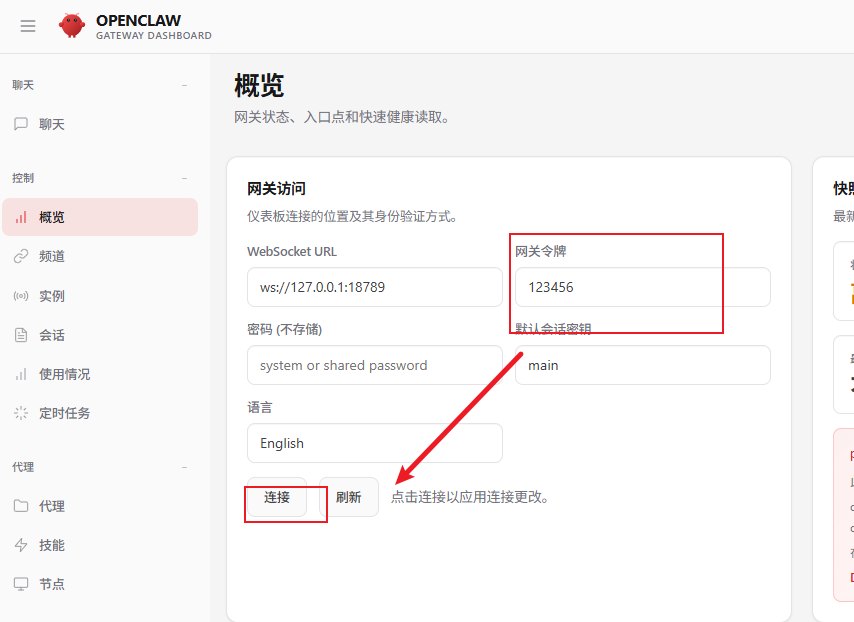
openclaw dashboard

可以配置

配置全在C:\Users\pc.openclaw

yaml
openclaw configure
yaml
http://127.0.0.1:18789/?token=40b40b3e376b1926c6da36ce636e91d61f20e1e2c0802d35

1.1.2 异常

bash
07:47:22 [gateway] [plugins] failed to load plugin: Error: Cannot find module 'clawdbot/plugin-sdk'
Require stack:
- C:\Users\pc\AppData\Roaming\npm\node_modules\openclaw\extensions\minimax-portal-auth\index.ts (plugin=minimax-portal-auth, source=C:\Users\pc\AppData\Roaming\npm\node_modules\openclaw\extensions\minimax-portal-auth\index.ts)
07:47:22 [canvas] host mounted at http://127.0.0.1:18789/__openclaw__/canvas/ (root C:\Users\pc\.openclaw\canvas)
07:47:22 [heartbeat] started
07:47:22 [gateway] agent model: minimax/MiniMax-M2.1
07:47:22 [gateway] listening on ws://127.0.0.1:18789 (PID 36348)
07:47:22 [gateway] listening on ws://[::1]:18789
07:47:22 [gateway] log file: \tmp\openclaw\openclaw-2026-02-02.log
07:47:22 [browser/service] Browser control service ready (profiles=2)
07:47:23 [discord] [default] Discord Message Content Intent is disabled; bot may not respond to channel messages. Enable it in Discord Dev Portal (Bot  Privileged Gateway Intents) or require mentions.
07:47:23 [discord] [default] starting provider (@openclaw)
07:47:25 [openclaw] Uncaught exception: Error: Fatal Gateway error: 4014
    at GatewayPlugin.handleReconnectionAttempt (file:///C:/Users/pc/AppData/Roaming/npm/node_modules/openclaw/node_modules/@buape/carbon/src/plugins/gateway/GatewayPlugin.ts:420:7)
    at GatewayPlugin.handleClose (file:///C:/Users/pc/AppData/Roaming/npm/node_modules/openclaw/node_modules/@buape/carbon/src/plugins/gateway/GatewayPlugin.ts:469:8)
    at WebSocket.<anonymous> (file:///C:/Users/pc/AppData/Roaming/npm/node_modules/openclaw/node_modules/@buape/carbon/src/plugins/gateway/GatewayPlugin.ts:379:9)
    at WebSocket.emit (node:events:508:28)
    at WebSocket.emitClose (C:\Users\pc\AppData\Roaming\npm\node_modules\openclaw\node_modules\ws\lib\websocket.js:273:10)
    at TLSSocket.socketOnClose (C:\Users\pc\AppData\Roaming\npm\node_modules\openclaw\node_modules\ws\lib\websocket.js:1346:15)
    at TLSSocket.emit (node:events:520:35)
    at node:net:346:12
    at TCP.done (node:_tls_wrap:649:7)

安装了这个才可以

yaml
npm i -g clawdbot@latest

2. 源码运行

yaml
git clone https://github.com/openclaw/openclaw.git
cd openclaw

pnpm install
pnpm ui:build # auto-installs UI deps on first run
pnpm build

pnpm openclaw onboard --install-daemon

# Dev loop (auto-reload on TS changes)
pnpm gateway:watch